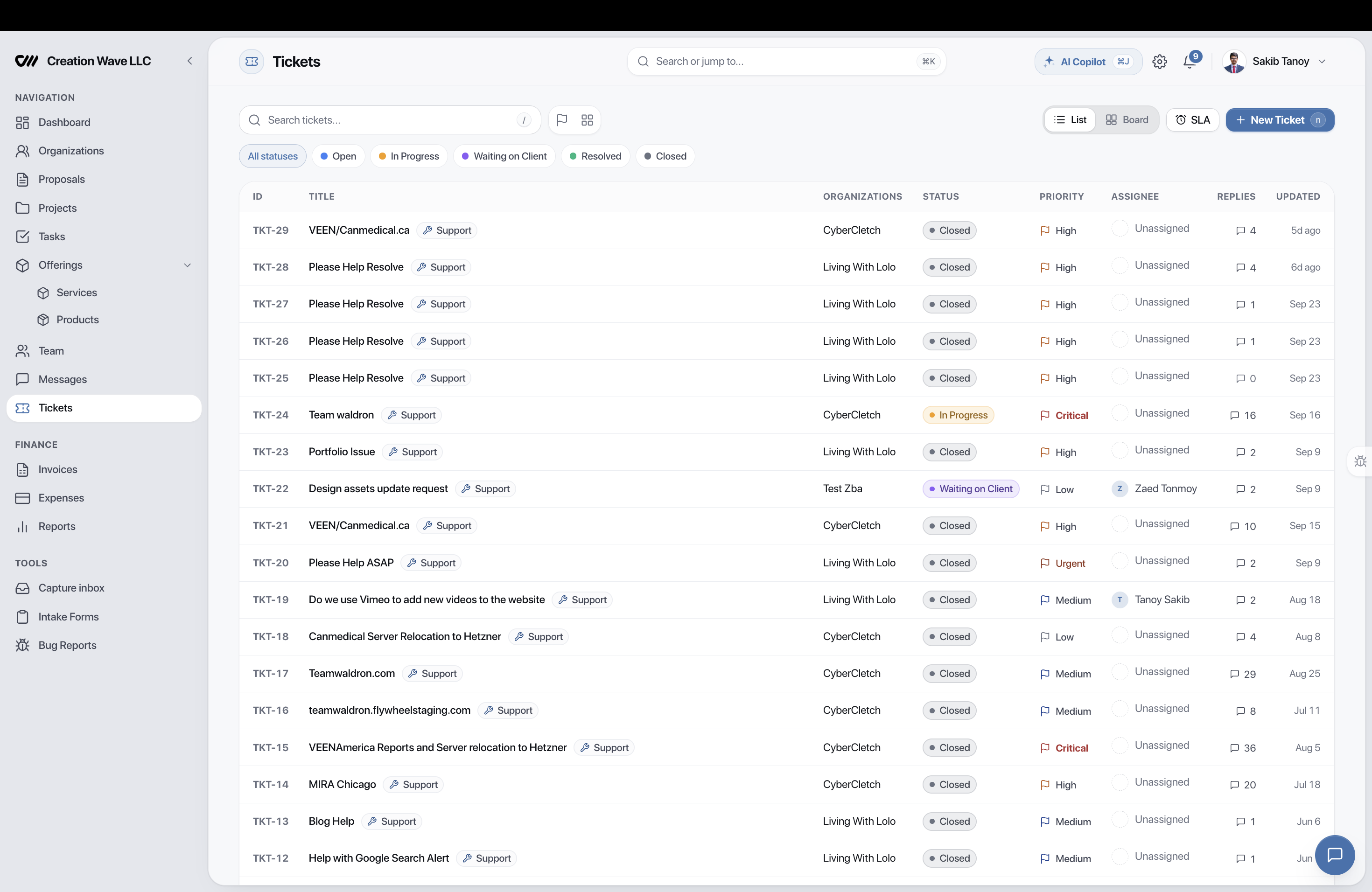
Tickets vs Tasks

  • Tickets — created by clients (bug reports, questions, change requests)
  • Tasks — created by your team (internal work, deliverables)
  • Ticket → Task bridge — convert a ticket into a linked task when work is needed
  • Separate lifecycles — tickets have SLA tracking, CSAT ratings, and priority escalation
  • Separate billing — ticket time and project time stay in distinct pipelines
🎫 TKT-104Open
Client: Acme Corp
PriorityHigh 🔴
SLA Response
Lifecycle

A clear path from request to resolution

Six default statuses guide every ticket through a structured workflow. Customize with your own statuses on Pro plans.

01Open
02Triaged
03In Progress
04Waiting
05Resolved
06Closed

Smart SLA computation

  • Per-priority targets — set response and resolution times for each priority level
  • Pause-aware — SLA clock pauses in "Waiting on Client" status automatically
  • Warning at 80% — notification to assigned agent and agency owner
  • Breach at 100% — escalation notification to owner and admin
  • Live timer — real-time SLA countdown visible in ticket detail
Critical
Urgent
High
Normal
Low

Role-based visibility

  • Org Owner & Admin — see all tickets for their organization
  • Org Member — sees only tickets they created or are watching
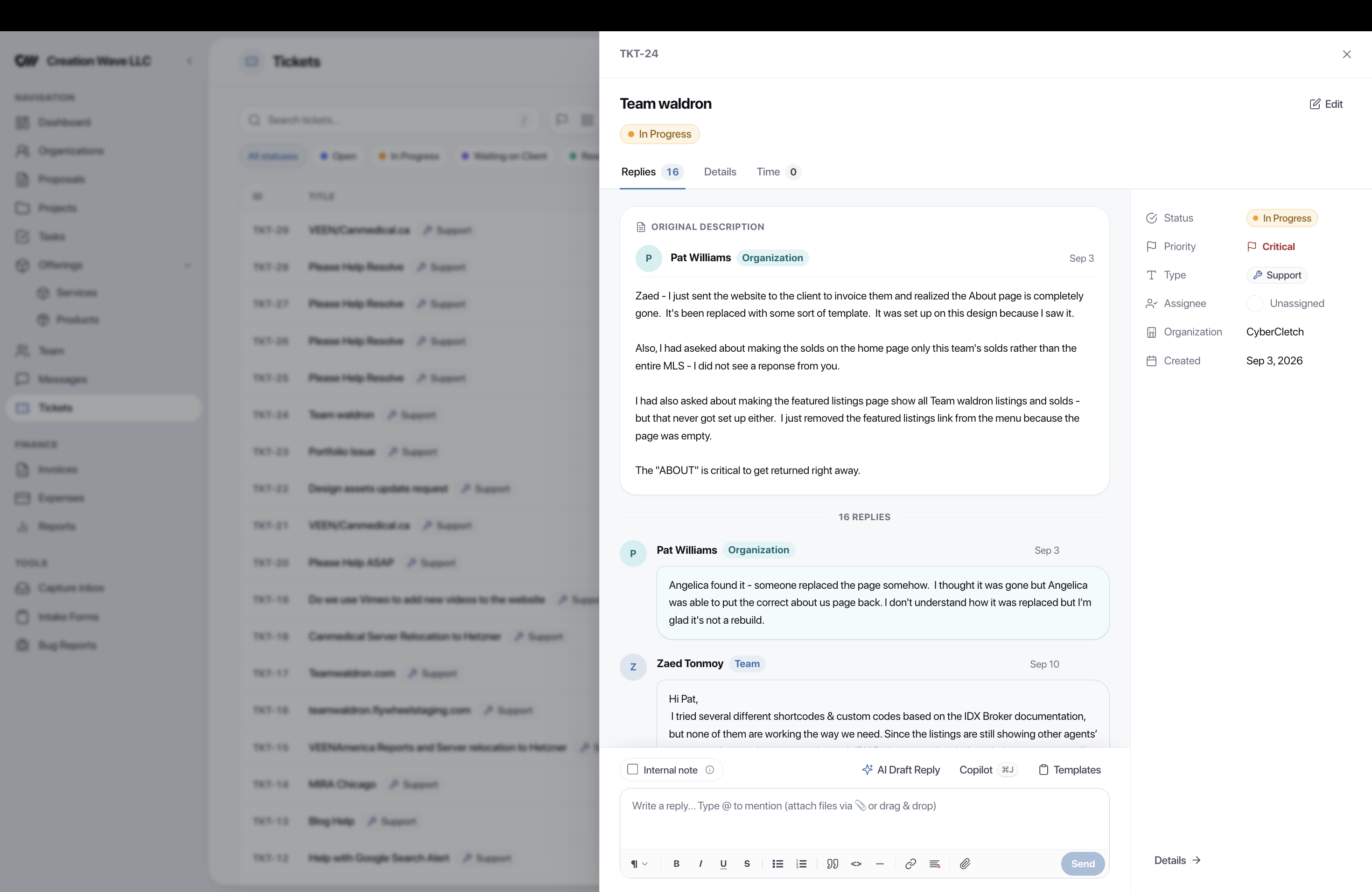
  • Clients can reply , upload attachments , and rate resolutions
  • Org Owner and Admin can reopen resolved tickets and manage watchers
  • Internal notes stay hidden — clients never see your private agent discussions
📋 Tickets PageSidebar Nav
❓ Need Help?Every Page
🐛 Report IssueProject Page

CSAT ratings built in

  • 1–5 star rating with optional text comment
  • Prompted via email notification and in-app on ticket resolution
  • Feeds into CRM health scoring — low CSAT signals at-risk clients
  • CSAT trend charts in the Reports → Support tab
  • Resolution events logged to the CRM activity timeline
★★★★★Excellent
Avg CSAT
Rated Tickets

Triggers & actions

  • ticket_created — auto-assign, notify, or create a linked task
  • ticket_status_changed — escalate, reassign, or send follow-ups
  • ticket_assigned — welcome message to the assigned agent
  • ticket_resolved — log to CRM, send CSAT prompt
  • ticket_sla_breached — escalate to owner + send urgent email
WhenTicket Created
If
ThenAssign → Dev Lead
Analytics

Reports & dashboard widgets

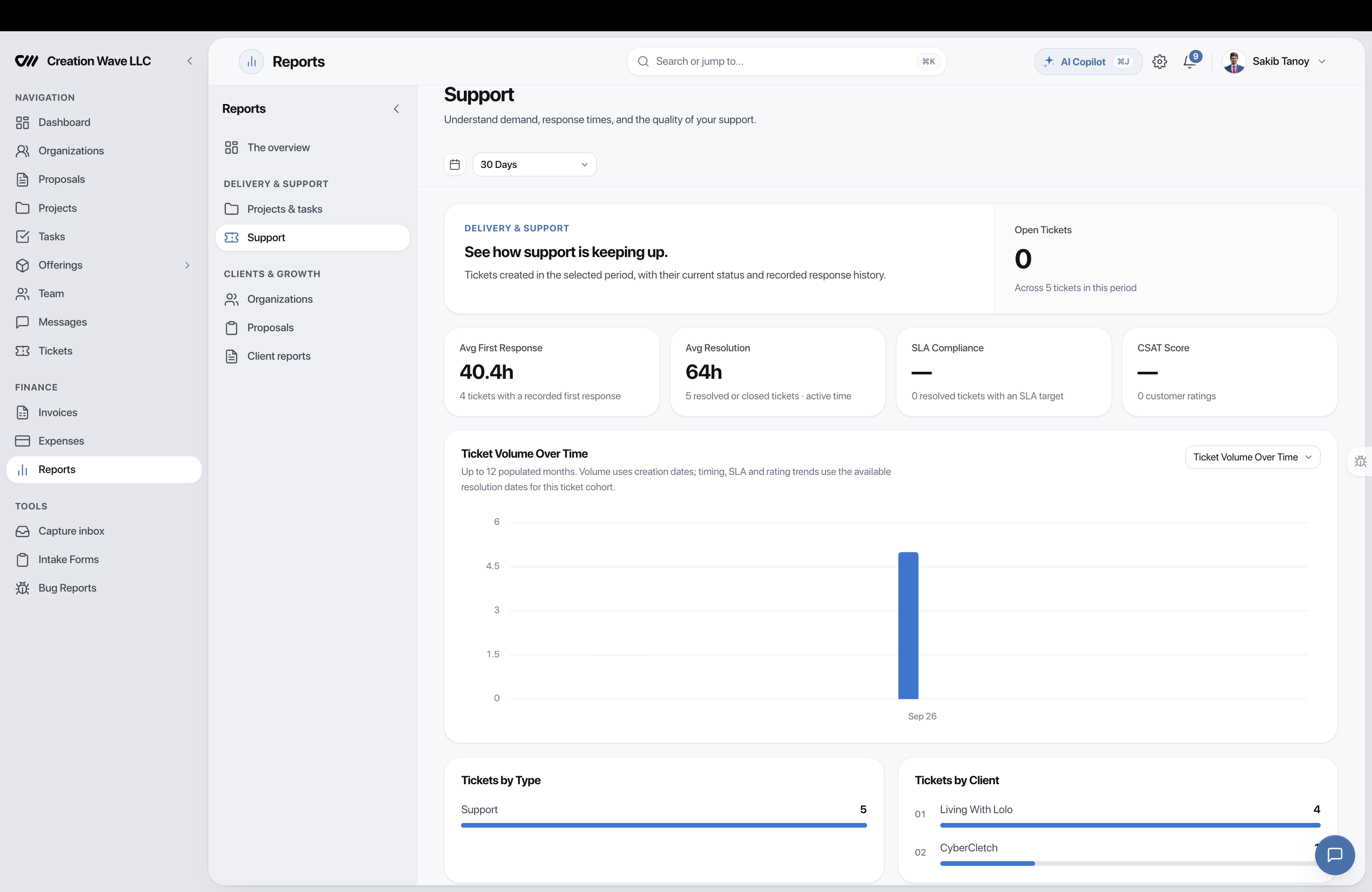
A dedicated Support tab in Reports with KPIs, 7 chart types, and 3 dashboard widgets — giving you complete visibility into support operations.

5 KPI Cards

Open tickets, avg first response time, avg resolution time, SLA compliance rate, and CSAT score.

7 Chart Types

Volume over time, by type, by client, resolution trend, SLA compliance, team workload, and CSAT trend.

3 Dashboard Widgets

Open tickets count, SLA breaches today, and overdue tickets — right on your executive dashboard.

Health Score Impact

Ticket data feeds into CRM health scoring — SLA breaches and low CSAT signal at-risk clients automatically.

Two billing pathways

  • Retainer deduction — if linked to a support service, hours auto-deduct from the retainer balance
  • Invoice generation — unbilled ticket time surfaces on the CRM page with a "Generate Support Invoice" button
  • Separate from projects — ticket time never appears in project budget tabs
  • Live timer — start/stop timer directly from the ticket detail drawer
Path A: RetainerAuto-Deduct
→ Service Hours
Path B: InvoiceGenerate
→ Support Invoice
5Ticket Types
5Priority Levels
6Default Statuses
5+Notifications
What Agencies Say

Support that scales with you

"

"Before Eidoncore, client support was scattered across emails, Slack, and spreadsheets. Now every request is tracked with SLA timers, and our resolution time dropped by 60%. The CSAT ratings showed us exactly where we needed to improve."

RH
Rachel HuangCOO, Summit Digital Agency
"

"The auto-assignment rules save us hours every week. Bug tickets go straight to our dev team, billing questions route to accounts, and everything has an SLA attached. Our clients love being able to submit tickets from their portal."

JT
Jake TorresFounder, Prism Creative Co.
FAQ

Frequently asked questions

Tickets represent external support requests from your clients (bug reports, questions, change requests). Tasks represent internal work for your agency team. A ticket CAN generate a linked task when work is needed, but the two systems stay separate — tickets track the conversation and resolution, tasks track the work.

SLA targets are configurable per priority level (first response time and resolution time). The system uses an accumulator approach that pauses the SLA clock when tickets are in "Waiting on Client" status, ensuring accurate measurement of your actual response time — not wall-clock time. You'll receive warning notifications at 80% and breach alerts at 100%.

Yes. Clients can submit and track tickets from a dedicated Tickets page in the portal, a "Need Help?" floating button on every portal page, or a "Report an Issue" button on project detail pages. Organization Owners and Admins see all tickets, while Members see only tickets they created or are watching.

Core ticketing requires the Starter plan or higher (limited to 50 open tickets). SLA tracking, CSAT ratings, custom statuses, canned templates, and ticket merging are available on Pro plans (unlimited tickets). Auto-assignment rules and email-to-ticket are Enterprise features.

Yes. Time logged on tickets follows a separate billing pipeline from project time. If the ticket is linked to a support retainer (OrgService), hours auto-deduct from the balance. Otherwise, unbilled ticket time surfaces on the client's CRM page with a "Generate Support Invoice" button.

Turn client support into a competitive advantage

Structured ticketing, SLA tracking, and CSAT ratings — included in every Starter plan and above. Start your 14-day free trial.